
Technical Specifications and Print Preparation Guide

In order to get full benefit from the high resolution and color accuracy offered by our digital printing technology, the files sent must comply with certain technical standards. As CVK Digital Ambalaj, we process only designs prepared in PDF format in order to ensure that our workflow processes proceed error-free and quickly.

Accepted File Format

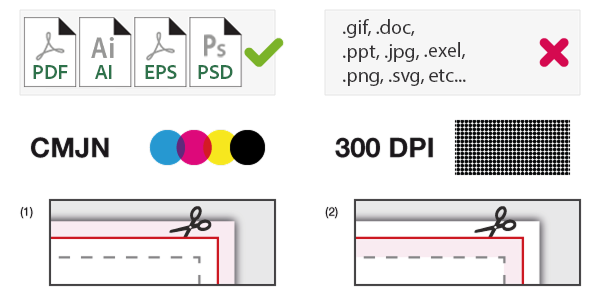
To ensure compatibility in pre-press preparation processes and to ensure that your design is preserved as you submit it, only high-resolution PDF files are accepted.

Technical Criteria for Print Preparation

In order for your design to be completed perfectly on our digital printing machines, please meet the following technical criteria. apply:

Color Management and CMYK Mode Our printing machines work in the CMYK color space. All images, colored backgrounds and texts in your design files must be prepared in CMYK mode. We are not responsible for chromatic aberrations that may occur in files sent in RGB mode.

Converting Fonts and Texts To avoid font errors or character shifts during file transfer, all texts in your PDF file must be "Convert" (Outline) must be made.

Image Resolution (DPI) In order for the product photographs and images on the packaging to appear clearly in printing, the resolution must be at least 300. DPI must be. Low resolution images may negatively affect digital printing quality.

Bleed and Safe Area At least 3 mm bleed outwards from the die-line borders to eliminate the margin of error in cutting and welding processes. share should be left. In addition, important texts and logos must be at least 5 mm inside (safe area) from the cutting line.

Technical Documentation and Certificates

All documents regarding the technical durability and legal compliance of our packaging materials. It can be presented to you in PDF format:

If you are hesitant about the suitability of your design for printing or if you need help with PDF export settings, CVK Digital Packaging technical team is happy to guide you.
Technical Specifications and File Preparation Guide
This guide has been prepared to ensure that your packaging design is ready for printing and produced with the highest quality. Paying attention to the following criteria when creating your file directly affects the print quality.
File Type:
PDF, AI, EPS
Color Mode:
CMYK (preferred) – RGB files are converted to CMYK by us.
Resolution:
300DPI
Scale:
1:1 (actual size)
Bleed:
+3 mm on each edge
Safe Area (Marge Technique):
Leave at least 2 mm from the edges
Texts and Logos:
Do not place too close to cut lines
💡 Be sure to protect the bleed margins to avoid visual losses in case of cutting or printing slippage.
Prepress Recommendations
✅ Things to Do
  • Export the file with maximum quality, without compression.
  • Vectorize (outline) fonts.
  • Embed the images into the file.
  • Design in reading orientation (to avoid reverse printing errors).
  • Avoid ink density exceeding 300%.
🚫 Things to Avoid
  • Do not submit files with crop lines, color gamuts, or alignment marks.
  • Do not use the “Save for web” feature.
  • Do not change the template dimensions; The scale should remain 1:1.
  • Do not include template lines in the print file.
White Support Layer
Purpose: White support makes colors appear more vibrant, especially on transparent or matte surfaces. File Submission Options:
Single PDF File:
  • Main design file.
  • A separate white support file named “White”.
ZIP File:
  • Main design file.
  • A separate white support file named “White”.
Suggestion:
  • Applying white support on light-toned surfaces increases color saturation.
  • If the white backing covers the entire surface, a 2 mm transparent edge is left for technical reasons.
  • Convert (outline) all vector elements if possible – for printing accuracy.
Color and Resolution Settings
Photoshop::
  • Color mode: Image > Mode > CMYK Colors
  • Resolution: Image > Image Size > 300 DPI
Illustrator::
  • Color mode: File > Document Color Mode > CMYK
  • PDF export: File > Export > High Resolution (300 DPI)
Need Design Help?
We are here to help you create the best look for your product. Make your brand stand out in a short time by collaborating with CVK Digital design team.